> ## Documentation Index
> Fetch the complete documentation index at: https://docs-dev-docs-add-auth0-cli-management-api-examples.mintlify.site/llms.txt
> Use this file to discover all available pages before exploring further.
> Describes how to configure session lifetime for a tenant using the Auth0 Dashboard, the Management API and Actions.
# Configure Session Lifetime
To configure a session lifetime, you can use the Auth0 [Dashboard](/docs/get-started/auth0-overview/dashboard), [Management API](https://auth0.com/docs/api/management/v2), or a [Post-Login Action](/docs/customize/actions/explore-triggers/signup-and-login-triggers/login-trigger).
## Auth0 Dashboard
To configure the session lifetime using Auth0 Dashboard:
1. Navigate to **Dashboard > Tenant Settings** and select the **Advanced** view.
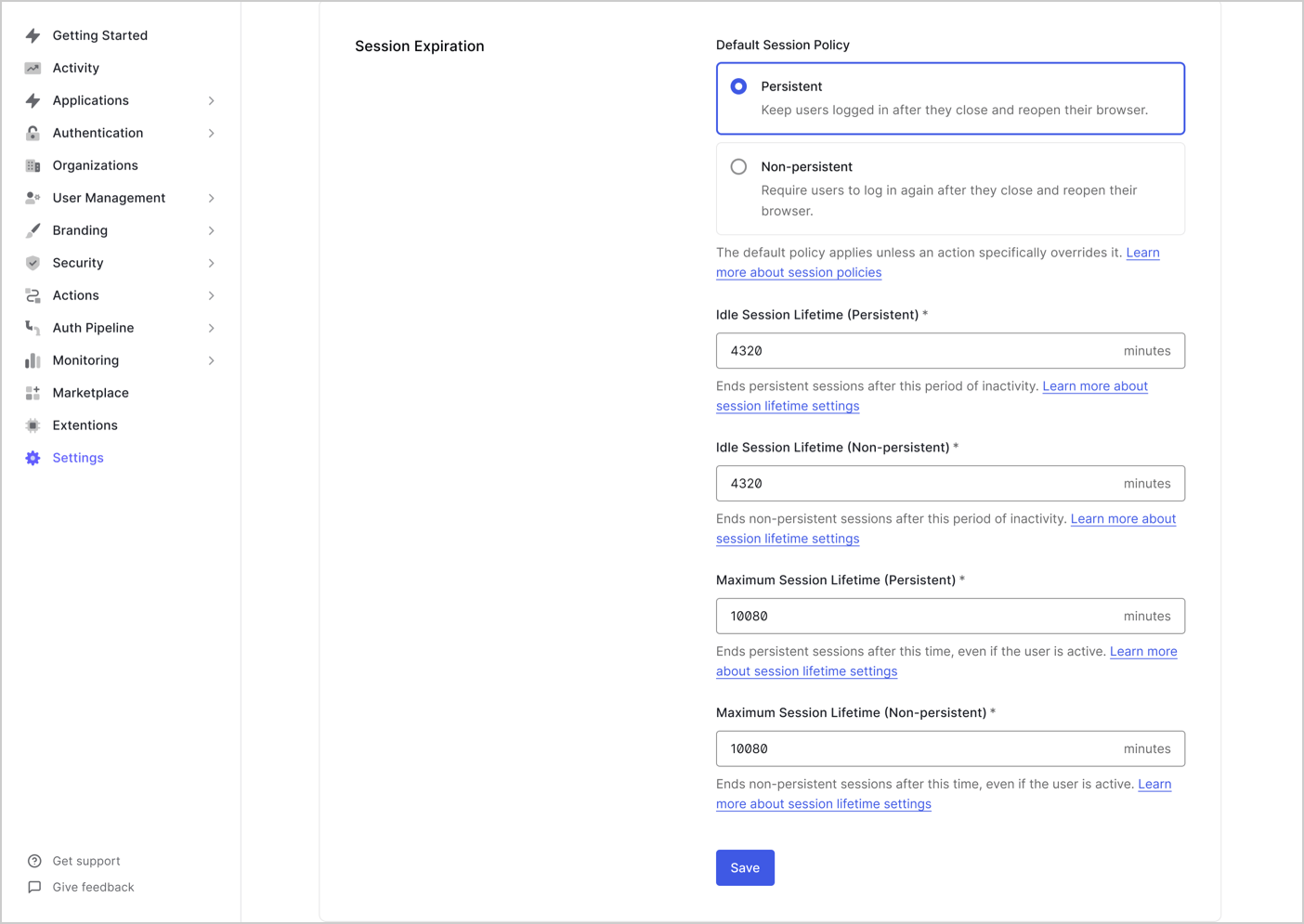
2. Under **Session Expiration**, you can configure:
| Session Policy | Description |
| --------------------------------------------- | ----------------------------------------------------------------------------------------- |
| **Idle Session Lifetime (Persistent)** | Maximum time (in minutes) of inactivity before a persistent session expires. |
| **Idle Session Lifetime (Non-Persistent)** | Maximum time (in minutes) of inactivity before a non-persistent session expires. |
| **Maximum Session Lifetime (Persistent)** | Maximum time (in minutes) a persistent session can exist, even if the user is active. |
| **Maximum Session Lifetime (Non-Persistent)** | Maximum time (in minutes) a non persistent session can exist, even if the user is active. |
 ## Auth0 Management API
To configure the session lifetime using the Auth0 Management API:
Calls to the `/api/v2/tenants/settings` endpoint require a [Management API access token](/docs/secure/tokens/access-tokens) with the `update:tenant_settings` scope.
Make a `PATCH` request to the [/api/v2/tenants/settings](/docs/api/management/v2/tenants/patch-settings) endpoint:
```bash theme={null}
auth0 api patch "tenants/settings" \
--data '{ "session_lifetime": SESSION_LIFETIME_VALUE, "idle_session_lifetime": IDLE_SESSION_LIFETIME_VALUE, "ephemeral_session_lifetime": EPHEMERAL_SESSION_LIFETIME_VALUE, "idle_ephemeral_session_lifetime": EPHEMERAL_IDLE_SESSION_LIFETIME_VALUE }'
```
Not logged in? [Set up and authenticate the Auth0 CLI](https://auth0.com/docs/deploy-monitor/auth0-cli) first.
```bash cURL theme={null}
curl --request PATCH \
--url 'https:///api/v2/tenants/settings' \
--header 'Authorization: Bearer MGMT_API_ACCESS_TOKEN' \
--header 'Content-Type: application/json' \
--data '{\
"session_lifetime": SESSION_LIFETIME_VALUE,\
"idle_session_lifetime": IDLE_SESSION_LIFETIME_VALUE,\
"ephemeral_session_lifetime": EPHEMERAL_SESSION_LIFETIME_VALUE,\
"idle_ephemeral_session_lifetime": EPHEMERAL_IDLE_SESSION_LIFETIME_VALUE\
}'
```
| Parameter | Description |
| --------------------------------- | ----------------------------------------------------------------------- |
| `session_lifetime` | Maximum duration (in hours) for absolute timeout. |
| `idle_session_lifetime` | Maximum duration (in hours) before a session expires due to inactivity. |
| `ephemeral_session_lifetime` | Maximum duration (in hours) for absolute timeout. |
| `idle_ephemeral_session_lifetime` | Maximum duration (in hours) before a session expires due to inactivity. |
## Auth0 Post-Login Actions
You can configure session behavior dynamically using `api.session` methods with a [post-login Action](/docs/customize/actions/explore-triggers/signup-and-login-triggers/login-trigger). This allows you to override default tenant session settings on a per-login basis, based on user or context-specific logic.
Use cases include:
* Shortening timeouts for high-risk logins
* Extending timeouts for trusted users or organizations
* Adjusting cookie persistence based on application type
The `api.session` methods available to configure session lifetimes are:
* `api.session.setExpiresAt`
* `api.session.setIdleExpiresAt`
* `api.session.setCookieMode`
The `api.session` methods only apply to the current session and must be called during the login transaction. These methods require that the event property `event.session.id` is available.
To learn more, read [Sessions with Actions](/docs/manage-users/sessions/manage-sessions-actions).
## Auth0 Management API
To configure the session lifetime using the Auth0 Management API:
Calls to the `/api/v2/tenants/settings` endpoint require a [Management API access token](/docs/secure/tokens/access-tokens) with the `update:tenant_settings` scope.
Make a `PATCH` request to the [/api/v2/tenants/settings](/docs/api/management/v2/tenants/patch-settings) endpoint:
```bash theme={null}
auth0 api patch "tenants/settings" \
--data '{ "session_lifetime": SESSION_LIFETIME_VALUE, "idle_session_lifetime": IDLE_SESSION_LIFETIME_VALUE, "ephemeral_session_lifetime": EPHEMERAL_SESSION_LIFETIME_VALUE, "idle_ephemeral_session_lifetime": EPHEMERAL_IDLE_SESSION_LIFETIME_VALUE }'
```
Not logged in? [Set up and authenticate the Auth0 CLI](https://auth0.com/docs/deploy-monitor/auth0-cli) first.
```bash cURL theme={null}
curl --request PATCH \
--url 'https:///api/v2/tenants/settings' \
--header 'Authorization: Bearer MGMT_API_ACCESS_TOKEN' \
--header 'Content-Type: application/json' \
--data '{\
"session_lifetime": SESSION_LIFETIME_VALUE,\
"idle_session_lifetime": IDLE_SESSION_LIFETIME_VALUE,\
"ephemeral_session_lifetime": EPHEMERAL_SESSION_LIFETIME_VALUE,\
"idle_ephemeral_session_lifetime": EPHEMERAL_IDLE_SESSION_LIFETIME_VALUE\
}'
```
| Parameter | Description |
| --------------------------------- | ----------------------------------------------------------------------- |
| `session_lifetime` | Maximum duration (in hours) for absolute timeout. |
| `idle_session_lifetime` | Maximum duration (in hours) before a session expires due to inactivity. |
| `ephemeral_session_lifetime` | Maximum duration (in hours) for absolute timeout. |
| `idle_ephemeral_session_lifetime` | Maximum duration (in hours) before a session expires due to inactivity. |
## Auth0 Post-Login Actions
You can configure session behavior dynamically using `api.session` methods with a [post-login Action](/docs/customize/actions/explore-triggers/signup-and-login-triggers/login-trigger). This allows you to override default tenant session settings on a per-login basis, based on user or context-specific logic.
Use cases include:
* Shortening timeouts for high-risk logins
* Extending timeouts for trusted users or organizations
* Adjusting cookie persistence based on application type
The `api.session` methods available to configure session lifetimes are:
* `api.session.setExpiresAt`
* `api.session.setIdleExpiresAt`
* `api.session.setCookieMode`
The `api.session` methods only apply to the current session and must be called during the login transaction. These methods require that the event property `event.session.id` is available.
To learn more, read [Sessions with Actions](/docs/manage-users/sessions/manage-sessions-actions).