> ## Documentation Index
> Fetch the complete documentation index at: https://docs-dev-docs-add-auth0-cli-management-api-examples.mintlify.site/llms.txt
> Use this file to discover all available pages before exploring further.

> Learn how to use variables to access and transform user data in Forms and Flows.

# Variables and helper functions

Variables allow you to access data contained in Forms and Flows to create custom business logic and automations.

Some basic considerations to using variables are:

* Variables are surrounded by curly brackets `{{ variable }}`.
* If a variable doesn't exist or can't be resolved, it has the same effect as an `undefined` variable.
* You can use nullish operators to handle `null` or `undefined` variables, for example:`{{fields.foo ?? fields.bar}}`.

## Available variables

You can use different types of variables to reference and transform data you gather from customers with Forms and Flows.

| Variable            | Syntax            | Where         | Description                                                      |
| ------------------- | ----------------- | ------------- | ---------------------------------------------------------------- |
| Context             | `{{context.*}}`   | Forms / Flows | Reference context data of the current transaction                |
| Form fields         | `{{fields.*}}`    | Forms / Flows | Reference data from your form fields and hidden fields           |
| Shared variables    | `{{vars.*}}`      | Forms / Flows | Reference data stored as shared variables                        |
| Flow actions output | `{{actions.*}}`   | Flows         | Reference data from the output response of previous flow actions |
| Helper functions    | `{{functions.*}}` | Forms / Flows | Helper functions to transform data                               |

### Context variables

Forms and flows automatically inherit context variables from the current transaction. You can access the following context variables:

* The `user` object, with access to the following properties:

  * `user.user_id`
  * `user.username`
  * `user.name`
  * `user.given_name`
  * `user.family_name`
  * `user.nickname`
  * `user.email`
  * `user.email_verified`
  * `user.phone_number`
  * `user.phone_verified`
  * `user.picture`
  * `user.user_metadata`
  * `user.app_metadata`
  * `user.created_at`
  * `user.updated_at`
  * `user.last_password_reset`
  * `user.identities`
* The `organization` object, with access to the following properties:

  * `organization.id`
  * `organization.name`
  * `organization.display_name`
  * `organization.metadata`
* The `client` object, with access to the following properties:

  * `client.client_id`
  * `client.name`
* The `tenant` object, with access to the following property:

  * `tenant.name`
* The `transaction` object, with access to the following property:

  * `transaction.state`
  * `transaction.correlation_id`
* The `custom_domain` object, with access to the following property:

  * `custom_domain.domain`
  * `custom_domain.domain_metadata`

<Accordion title="Example of context object">
  ```json lines expandable theme={null}
  {
    "user": {
      "user_id": "auth0|658409...",
      "name": "ana@travel0.com",
      "nickname": "ana",
      "email": "ana@travel0.com",
      "email_verified": true,
      "picture": "https://s.gravatar.com/avatar/8eb1b522f6...",
      "user_metadata": {},
      "app_metadata": {},
      "created_at": "2023-12-21T09:46:40.487Z",
      "updated_at": "2024-05-07T10:44:26.271Z",
      "last_password_reset": "2023-12-21T09:49:08.932Z",
      "identities": [
        {
          "user_id": "6584...",
          "isSocial": false,
          "provider": "auth0",
          "connection": "Username-Password-Authentication"
        }
      ]
    },
    "client": {
      "client_id": "xpeg5...",
      "name": "My App"
    },
    "tenant": {
      "name": "tenant-testing"
    },
    "transaction": {
      "state": "hKFo2SBId2M0..."
    },
    "custom_domain": {
      "domain": "example.com",
      "domain_metadata": {
        "key": "value"
      }
    }
  }
  ```
</Accordion>

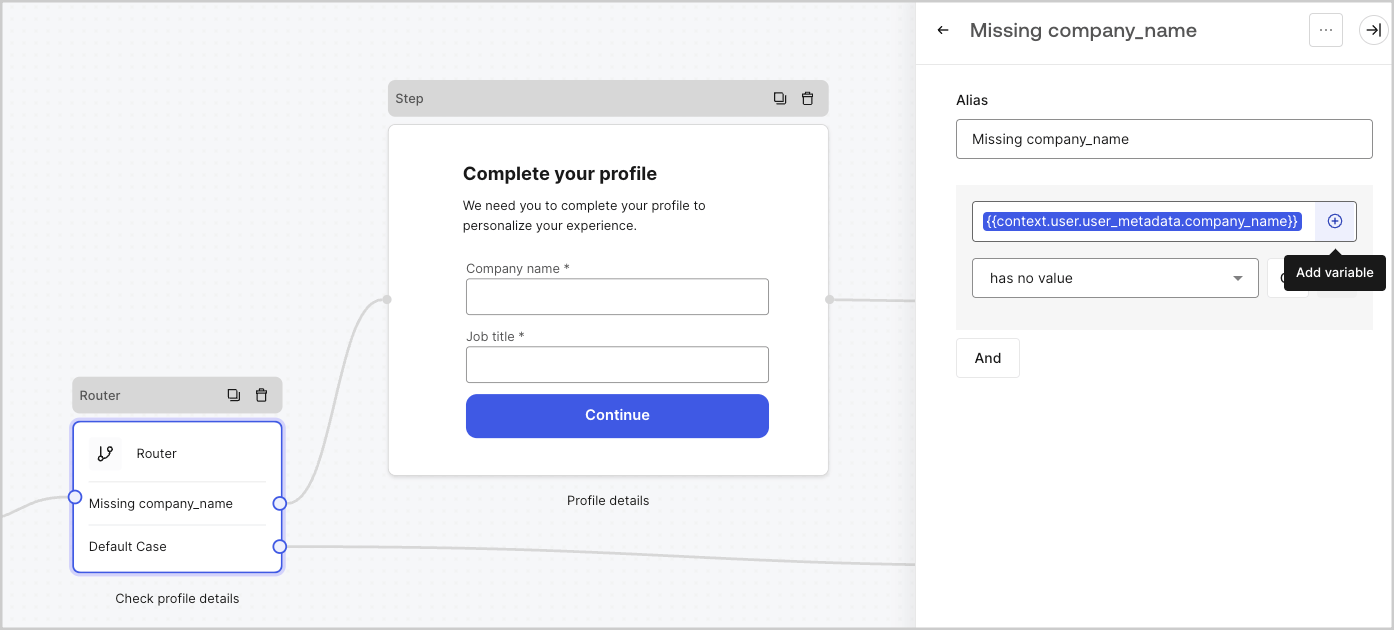
For example:  `{{context.user.user_id}}` references the `user_id` of the `user` object.

<Frame>
  <img src="https://mintcdn.com/docs-dev-docs-add-auth0-cli-management-api-examples/1z8Uqwf-Ck-y347i/docs/images/cdy7uua7fh8z/3B8DRhXO2wGqeqSFb8KbQv/0a61cdbbb7f1d290950a2ddb9857aac3/Contex-variable.png?fit=max&auto=format&n=1z8Uqwf-Ck-y347i&q=85&s=4a49728013548ff1b5d5fc3a70ec474c" alt="Dashboard > Forms > Flows" data-og-width="1141" width="1141" data-og-height="219" height="219" data-path="docs/images/cdy7uua7fh8z/3B8DRhXO2wGqeqSFb8KbQv/0a61cdbbb7f1d290950a2ddb9857aac3/Contex-variable.png" data-optimize="true" data-opv="3" srcset="https://mintcdn.com/docs-dev-docs-add-auth0-cli-management-api-examples/1z8Uqwf-Ck-y347i/docs/images/cdy7uua7fh8z/3B8DRhXO2wGqeqSFb8KbQv/0a61cdbbb7f1d290950a2ddb9857aac3/Contex-variable.png?w=280&fit=max&auto=format&n=1z8Uqwf-Ck-y347i&q=85&s=ad51c55cf0d32ee93ae7ab99607d4ae8 280w, https://mintcdn.com/docs-dev-docs-add-auth0-cli-management-api-examples/1z8Uqwf-Ck-y347i/docs/images/cdy7uua7fh8z/3B8DRhXO2wGqeqSFb8KbQv/0a61cdbbb7f1d290950a2ddb9857aac3/Contex-variable.png?w=560&fit=max&auto=format&n=1z8Uqwf-Ck-y347i&q=85&s=f7ca943bcb869480ea2937d5c3fde1bf 560w, https://mintcdn.com/docs-dev-docs-add-auth0-cli-management-api-examples/1z8Uqwf-Ck-y347i/docs/images/cdy7uua7fh8z/3B8DRhXO2wGqeqSFb8KbQv/0a61cdbbb7f1d290950a2ddb9857aac3/Contex-variable.png?w=840&fit=max&auto=format&n=1z8Uqwf-Ck-y347i&q=85&s=dd79e53c445246acd43e40d85ae6403e 840w, https://mintcdn.com/docs-dev-docs-add-auth0-cli-management-api-examples/1z8Uqwf-Ck-y347i/docs/images/cdy7uua7fh8z/3B8DRhXO2wGqeqSFb8KbQv/0a61cdbbb7f1d290950a2ddb9857aac3/Contex-variable.png?w=1100&fit=max&auto=format&n=1z8Uqwf-Ck-y347i&q=85&s=ac052a9cd09331c66310f8ef820ab39a 1100w, https://mintcdn.com/docs-dev-docs-add-auth0-cli-management-api-examples/1z8Uqwf-Ck-y347i/docs/images/cdy7uua7fh8z/3B8DRhXO2wGqeqSFb8KbQv/0a61cdbbb7f1d290950a2ddb9857aac3/Contex-variable.png?w=1650&fit=max&auto=format&n=1z8Uqwf-Ck-y347i&q=85&s=dc9f81212834dbb12d9a72a98e9f26bd 1650w, https://mintcdn.com/docs-dev-docs-add-auth0-cli-management-api-examples/1z8Uqwf-Ck-y347i/docs/images/cdy7uua7fh8z/3B8DRhXO2wGqeqSFb8KbQv/0a61cdbbb7f1d290950a2ddb9857aac3/Contex-variable.png?w=2500&fit=max&auto=format&n=1z8Uqwf-Ck-y347i&q=85&s=8c4f6a2c9b23cce21bff1e69d753c34a 2500w" />
</Frame>

### Form fields variables

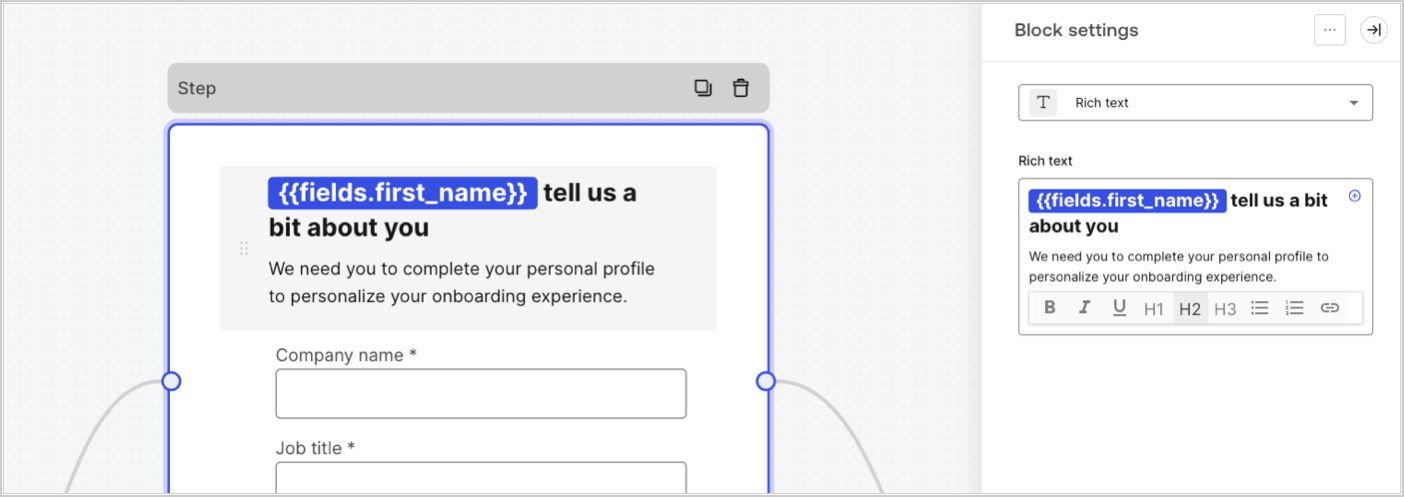
Field variables contain data collected from the user from input fields in the form and data from hidden fields. The data of each field varies depending on the field type. For example: `{{fields.first_name}}` references the input value of a field with the ID `first_name`.
<Frame>
  <img src="https://mintcdn.com/docs-dev-docs-add-auth0-cli-management-api-examples/MicEsu-0kqmuAXRI/docs/images/cdy7uua7fh8z/4D42A6ww4XvFxweoxh04Rd/016c2ed9d25bc2267ed3ed31bf8b2bf6/form-fields-variable.png?fit=max&auto=format&n=MicEsu-0kqmuAXRI&q=85&s=723ab6ee51debf5e9ce576a0ea91b4d3" alt="Dashboard > Actions > Forms > Form" data-og-width="1404" width="1404" data-og-height="497" height="497" data-path="docs/images/cdy7uua7fh8z/4D42A6ww4XvFxweoxh04Rd/016c2ed9d25bc2267ed3ed31bf8b2bf6/form-fields-variable.png" data-optimize="true" data-opv="3" srcset="https://mintcdn.com/docs-dev-docs-add-auth0-cli-management-api-examples/MicEsu-0kqmuAXRI/docs/images/cdy7uua7fh8z/4D42A6ww4XvFxweoxh04Rd/016c2ed9d25bc2267ed3ed31bf8b2bf6/form-fields-variable.png?w=280&fit=max&auto=format&n=MicEsu-0kqmuAXRI&q=85&s=aa06456615a9265a51f1f1918f1e3c1b 280w, https://mintcdn.com/docs-dev-docs-add-auth0-cli-management-api-examples/MicEsu-0kqmuAXRI/docs/images/cdy7uua7fh8z/4D42A6ww4XvFxweoxh04Rd/016c2ed9d25bc2267ed3ed31bf8b2bf6/form-fields-variable.png?w=560&fit=max&auto=format&n=MicEsu-0kqmuAXRI&q=85&s=80a8108bad7537d59fcdf217b03e4446 560w, https://mintcdn.com/docs-dev-docs-add-auth0-cli-management-api-examples/MicEsu-0kqmuAXRI/docs/images/cdy7uua7fh8z/4D42A6ww4XvFxweoxh04Rd/016c2ed9d25bc2267ed3ed31bf8b2bf6/form-fields-variable.png?w=840&fit=max&auto=format&n=MicEsu-0kqmuAXRI&q=85&s=2a0a8af14a48b818ea2f2b50ff451125 840w, https://mintcdn.com/docs-dev-docs-add-auth0-cli-management-api-examples/MicEsu-0kqmuAXRI/docs/images/cdy7uua7fh8z/4D42A6ww4XvFxweoxh04Rd/016c2ed9d25bc2267ed3ed31bf8b2bf6/form-fields-variable.png?w=1100&fit=max&auto=format&n=MicEsu-0kqmuAXRI&q=85&s=0f532435ba2b370bed89facbb1630a82 1100w, https://mintcdn.com/docs-dev-docs-add-auth0-cli-management-api-examples/MicEsu-0kqmuAXRI/docs/images/cdy7uua7fh8z/4D42A6ww4XvFxweoxh04Rd/016c2ed9d25bc2267ed3ed31bf8b2bf6/form-fields-variable.png?w=1650&fit=max&auto=format&n=MicEsu-0kqmuAXRI&q=85&s=62b8b38b24ee35ce9495f2547ab2550b 1650w, https://mintcdn.com/docs-dev-docs-add-auth0-cli-management-api-examples/MicEsu-0kqmuAXRI/docs/images/cdy7uua7fh8z/4D42A6ww4XvFxweoxh04Rd/016c2ed9d25bc2267ed3ed31bf8b2bf6/form-fields-variable.png?w=2500&fit=max&auto=format&n=MicEsu-0kqmuAXRI&q=85&s=b4abf0d796a4da24b66689a78eb5bd5e 2500w" />
</Frame>

### Flow output actions variables

When a flow action is executed, it generates an output object response that can be referenced in subsequent actions. For example: `{{actions.generate_otp.code}}` references the output code of the action with ID `generate_otp`.

<Frame>
  <img src="https://mintcdn.com/docs-dev-docs-add-auth0-cli-management-api-examples/8Xt9BaI5_qlm0wDg/docs/images/cdy7uua7fh8z/6jYtEdYqSGXm3DDv0mxQ0o/2d48012629745e07137bf6ba42f4d829/flow-output-variable.png?fit=max&auto=format&n=8Xt9BaI5_qlm0wDg&q=85&s=dd7432b28ca6d2617eaa906ccb7ad051" alt="Dashboard > Actions > Forms > Flows" data-og-width="1404" width="1404" data-og-height="253" height="253" data-path="docs/images/cdy7uua7fh8z/6jYtEdYqSGXm3DDv0mxQ0o/2d48012629745e07137bf6ba42f4d829/flow-output-variable.png" data-optimize="true" data-opv="3" srcset="https://mintcdn.com/docs-dev-docs-add-auth0-cli-management-api-examples/8Xt9BaI5_qlm0wDg/docs/images/cdy7uua7fh8z/6jYtEdYqSGXm3DDv0mxQ0o/2d48012629745e07137bf6ba42f4d829/flow-output-variable.png?w=280&fit=max&auto=format&n=8Xt9BaI5_qlm0wDg&q=85&s=7d2681341cc18bc4fa7f51af68210df7 280w, https://mintcdn.com/docs-dev-docs-add-auth0-cli-management-api-examples/8Xt9BaI5_qlm0wDg/docs/images/cdy7uua7fh8z/6jYtEdYqSGXm3DDv0mxQ0o/2d48012629745e07137bf6ba42f4d829/flow-output-variable.png?w=560&fit=max&auto=format&n=8Xt9BaI5_qlm0wDg&q=85&s=06155289ce5f36911006971773c8dfdd 560w, https://mintcdn.com/docs-dev-docs-add-auth0-cli-management-api-examples/8Xt9BaI5_qlm0wDg/docs/images/cdy7uua7fh8z/6jYtEdYqSGXm3DDv0mxQ0o/2d48012629745e07137bf6ba42f4d829/flow-output-variable.png?w=840&fit=max&auto=format&n=8Xt9BaI5_qlm0wDg&q=85&s=cacb9987e4b2bb28ea54af693a835387 840w, https://mintcdn.com/docs-dev-docs-add-auth0-cli-management-api-examples/8Xt9BaI5_qlm0wDg/docs/images/cdy7uua7fh8z/6jYtEdYqSGXm3DDv0mxQ0o/2d48012629745e07137bf6ba42f4d829/flow-output-variable.png?w=1100&fit=max&auto=format&n=8Xt9BaI5_qlm0wDg&q=85&s=7b95b2b9ee84c0124a5e2c603ae1847f 1100w, https://mintcdn.com/docs-dev-docs-add-auth0-cli-management-api-examples/8Xt9BaI5_qlm0wDg/docs/images/cdy7uua7fh8z/6jYtEdYqSGXm3DDv0mxQ0o/2d48012629745e07137bf6ba42f4d829/flow-output-variable.png?w=1650&fit=max&auto=format&n=8Xt9BaI5_qlm0wDg&q=85&s=df1e304cb51d76d8baaca8711be22708 1650w, https://mintcdn.com/docs-dev-docs-add-auth0-cli-management-api-examples/8Xt9BaI5_qlm0wDg/docs/images/cdy7uua7fh8z/6jYtEdYqSGXm3DDv0mxQ0o/2d48012629745e07137bf6ba42f4d829/flow-output-variable.png?w=2500&fit=max&auto=format&n=8Xt9BaI5_qlm0wDg&q=85&s=308a4e709b67ede3ce4fbf738675a583 2500w" />
</Frame>

### Shared variables

You can store variables to be shared with subsequent flows or even with form components in the same transaction. Shared variables are ephemeral and are associated with a specific form journey. Their values cannot be accessed outside of that journey. For example: `{{vars.external_id}}` references the value of a shared variable with ID `external_id`.

<Frame>
  <img src="https://mintcdn.com/docs-dev-docs-add-auth0-cli-management-api-examples/MicEsu-0kqmuAXRI/docs/images/cdy7uua7fh8z/4571ExRTHL0KZKJKX9pNwj/abb631b8608a6356b0e5b3784cf8b02f/flow-shared-variable.png?fit=max&auto=format&n=MicEsu-0kqmuAXRI&q=85&s=4dcb3c9ee738fa89d8ee5833dac38486" alt="Dashboard > Actions > Forms > Flows" data-og-width="1215" width="1215" data-og-height="162" height="162" data-path="docs/images/cdy7uua7fh8z/4571ExRTHL0KZKJKX9pNwj/abb631b8608a6356b0e5b3784cf8b02f/flow-shared-variable.png" data-optimize="true" data-opv="3" srcset="https://mintcdn.com/docs-dev-docs-add-auth0-cli-management-api-examples/MicEsu-0kqmuAXRI/docs/images/cdy7uua7fh8z/4571ExRTHL0KZKJKX9pNwj/abb631b8608a6356b0e5b3784cf8b02f/flow-shared-variable.png?w=280&fit=max&auto=format&n=MicEsu-0kqmuAXRI&q=85&s=02529ae4044ea8552cf2d51617abb5c9 280w, https://mintcdn.com/docs-dev-docs-add-auth0-cli-management-api-examples/MicEsu-0kqmuAXRI/docs/images/cdy7uua7fh8z/4571ExRTHL0KZKJKX9pNwj/abb631b8608a6356b0e5b3784cf8b02f/flow-shared-variable.png?w=560&fit=max&auto=format&n=MicEsu-0kqmuAXRI&q=85&s=bea661097d69a2fce82e03a9b654eb7c 560w, https://mintcdn.com/docs-dev-docs-add-auth0-cli-management-api-examples/MicEsu-0kqmuAXRI/docs/images/cdy7uua7fh8z/4571ExRTHL0KZKJKX9pNwj/abb631b8608a6356b0e5b3784cf8b02f/flow-shared-variable.png?w=840&fit=max&auto=format&n=MicEsu-0kqmuAXRI&q=85&s=e8cd3be8dbb373d76f7371f972c6ca83 840w, https://mintcdn.com/docs-dev-docs-add-auth0-cli-management-api-examples/MicEsu-0kqmuAXRI/docs/images/cdy7uua7fh8z/4571ExRTHL0KZKJKX9pNwj/abb631b8608a6356b0e5b3784cf8b02f/flow-shared-variable.png?w=1100&fit=max&auto=format&n=MicEsu-0kqmuAXRI&q=85&s=82ac07d510bee8527305b059b94dce03 1100w, https://mintcdn.com/docs-dev-docs-add-auth0-cli-management-api-examples/MicEsu-0kqmuAXRI/docs/images/cdy7uua7fh8z/4571ExRTHL0KZKJKX9pNwj/abb631b8608a6356b0e5b3784cf8b02f/flow-shared-variable.png?w=1650&fit=max&auto=format&n=MicEsu-0kqmuAXRI&q=85&s=9774070ca40e50378345ef7534949074 1650w, https://mintcdn.com/docs-dev-docs-add-auth0-cli-management-api-examples/MicEsu-0kqmuAXRI/docs/images/cdy7uua7fh8z/4571ExRTHL0KZKJKX9pNwj/abb631b8608a6356b0e5b3784cf8b02f/flow-shared-variable.png?w=2500&fit=max&auto=format&n=MicEsu-0kqmuAXRI&q=85&s=78ee2a4a00d39e4d0b726fd09ec7dcab 2500w" />
</Frame>

<Warning>
  Shared variables:

  * are internal (server-side) and not exposed to the browser (client-side).
  * can be resolved and exposed to the browser if you referenced a shared variable in the form component.
  * might have sensitive information, so take care when you access shared variable to avoid any unnecessary or unintentional exposure.
</Warning>

### Helper functions

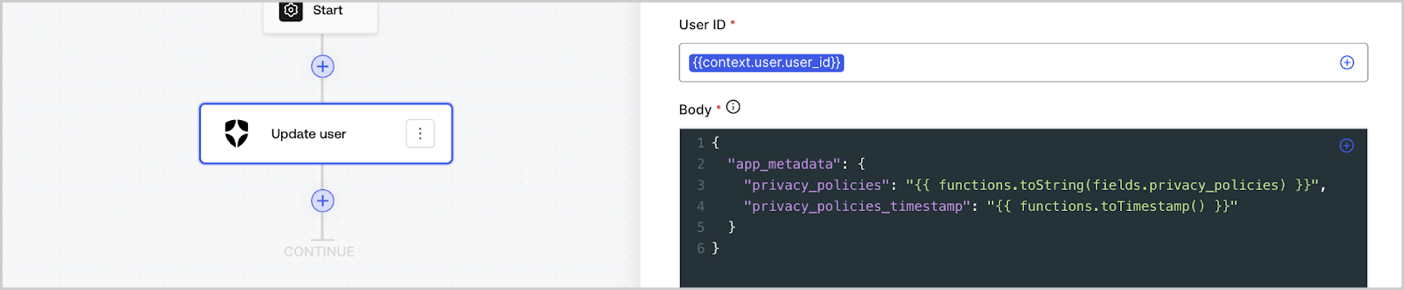
Helper functions let you transform data and perform simple operations. For example: `{{functions.toString(fields.privacy_policies)}}` transform the value of the field with ID `privacy_policies` using the `toString()` function.
<Frame>
  <img src="https://mintcdn.com/docs-dev-docs-add-auth0-cli-management-api-examples/i9mIpcfLxROfkyru/docs/images/cdy7uua7fh8z/1gyox33XJEtdkT43NppblT/0e878cc5ae2bde11b4207e105bbac6c5/flow-helper-functions.png?fit=max&auto=format&n=i9mIpcfLxROfkyru&q=85&s=7d9341de11449afbef5c140a744ea28e" alt="Dashboard > Actions > Forms > Flows" data-og-width="1404" width="1404" data-og-height="290" height="290" data-path="docs/images/cdy7uua7fh8z/1gyox33XJEtdkT43NppblT/0e878cc5ae2bde11b4207e105bbac6c5/flow-helper-functions.png" data-optimize="true" data-opv="3" srcset="https://mintcdn.com/docs-dev-docs-add-auth0-cli-management-api-examples/i9mIpcfLxROfkyru/docs/images/cdy7uua7fh8z/1gyox33XJEtdkT43NppblT/0e878cc5ae2bde11b4207e105bbac6c5/flow-helper-functions.png?w=280&fit=max&auto=format&n=i9mIpcfLxROfkyru&q=85&s=cdf23c768942f2d82a877378250f231b 280w, https://mintcdn.com/docs-dev-docs-add-auth0-cli-management-api-examples/i9mIpcfLxROfkyru/docs/images/cdy7uua7fh8z/1gyox33XJEtdkT43NppblT/0e878cc5ae2bde11b4207e105bbac6c5/flow-helper-functions.png?w=560&fit=max&auto=format&n=i9mIpcfLxROfkyru&q=85&s=2df54d4bb04cab4cccc57679c50bdf1b 560w, https://mintcdn.com/docs-dev-docs-add-auth0-cli-management-api-examples/i9mIpcfLxROfkyru/docs/images/cdy7uua7fh8z/1gyox33XJEtdkT43NppblT/0e878cc5ae2bde11b4207e105bbac6c5/flow-helper-functions.png?w=840&fit=max&auto=format&n=i9mIpcfLxROfkyru&q=85&s=3a28a74b9e0eccebb7d5b1d759cb905c 840w, https://mintcdn.com/docs-dev-docs-add-auth0-cli-management-api-examples/i9mIpcfLxROfkyru/docs/images/cdy7uua7fh8z/1gyox33XJEtdkT43NppblT/0e878cc5ae2bde11b4207e105bbac6c5/flow-helper-functions.png?w=1100&fit=max&auto=format&n=i9mIpcfLxROfkyru&q=85&s=180dbbdb59bc06114fe02ef599404117 1100w, https://mintcdn.com/docs-dev-docs-add-auth0-cli-management-api-examples/i9mIpcfLxROfkyru/docs/images/cdy7uua7fh8z/1gyox33XJEtdkT43NppblT/0e878cc5ae2bde11b4207e105bbac6c5/flow-helper-functions.png?w=1650&fit=max&auto=format&n=i9mIpcfLxROfkyru&q=85&s=e5218db6e24150c5a982dbd9edf1da27 1650w, https://mintcdn.com/docs-dev-docs-add-auth0-cli-management-api-examples/i9mIpcfLxROfkyru/docs/images/cdy7uua7fh8z/1gyox33XJEtdkT43NppblT/0e878cc5ae2bde11b4207e105bbac6c5/flow-helper-functions.png?w=2500&fit=max&auto=format&n=i9mIpcfLxROfkyru&q=85&s=d53e8b9e1ad856f28d17539d1749e3ee 2500w" />
</Frame>

The available helper functions are:

| Function                                 | Description                                                                                                                                                                                                                                                              | Example                                                                                                          |
| ---------------------------------------- | ------------------------------------------------------------------------------------------------------------------------------------------------------------------------------------------------------------------------------------------------------------------------ | ---------------------------------------------------------------------------------------------------------------- |
| `toArray(value)`                         | Converts value to an array.                                                                                                                                                                                                                                              | `{{ functions.toArray('abc') }} // ['abc']`                                                                      |
| `toBoolean(value)`                       | Converts value to a boolean value.                                                                                                                                                                                                                                       | `{{ functions.toBoolean(1) }} // true&lt;br /&gt;&lt;br /&gt;\{\{ functions.toBoolean(0) }} // false`            |
| `length(value)`                          | Returns the length of the parameter value.                                                                                                                                                                                                                               | `{{ functions.length('auth0') }} // 5`                                                                           |
| `mask(value)`                            | Masks a value to avoid be exposed in Executions.                                                                                                                                                                                                                         | `{{ functions.mask('my_awesome_secret') }} // ███`                                                               |
| `toNumber(value)`                        | Converts value to a number.                                                                                                                                                                                                                                              | `{{ functions.toNumber('123') }} // 123`                                                                         |
| `random(min, max, [boolean])`            | Returns a random number between the inclusive min and max.                                                                                                                                                                                                               | `{{ functions.random(0, 6) }} // 4 &lt;br /&gt;&lt;br /&gt;\{\{ functions.random(0, 6, true) }} // 3.8523497...` |
| `slice(value, start, end)`               | Returns a section of a value array or string between the start and end indexes.                                                                                                                                                                                          | `{{ functions.slice( 'example', 3, 5) }} // 'mp'`                                                                |
| `toString(value)`                        | Converts value to a string.                                                                                                                                                                                                                                              | `{{ functions.toString(123) }} // '123'`                                                                         |
| `substring(value, start, end)`           | Returns a section of a value between the start and end indexes. Read about the [differences of slice and substring functions](https://developer.mozilla.org/en-US/docs/Web/JavaScript/Reference/Global_Objects/String/substring#differences_between_substring_and_slice) | `{{ functions.substring( 'example’', 3, 5) }} // 'mp'`                                                           |
| `toTimestamp()`                          | Returns the current UNIX timestamp.                                                                                                                                                                                                                                      | `{{ functions.toTimestamp() }} // 1628761483`                                                                    |
| `toTimestamp(date)`                      | Returns the provided date in UNIX time.                                                                                                                                                                                                                                  | `{{ functions.toTimestamp('2021-04-30T10:02:50.876Z') }} // 1619776970`                                          |
| `toTimestamp(date)`                      | Returns the provided date in UNIX time.                                                                                                                                                                                                                                  | `{{ functions.toTimestamp('2021-04-30T10:02:50.876Z') }} // 1619776970`                                          |
| `toLowerCase(value)`                     | Returns a new string transformed to lowercase.                                                                                                                                                                                                                           | `{{ functions.toLowerCase('JohnDoe 1234') }} // johndoe 1234`                                                    |
| `toUpperCase(value)`                     | Returns a new string transformed to uppercase.                                                                                                                                                                                                                           | `{{ functions.toUpperCase('JohnDoe 1234') }} // JOHNDOE 1234`                                                    |
| `replaceAll(value, string, replacement)` | Returns a new string with all matches of a pattern replaced by a replacement.                                                                                                                                                                                            | `{{ functions.replaceAll('2021-04-30', '-', '/') }} // 2021/04/30`                                               |
| `replace(value, string, replacement)`    | Returns a new string with all matches of a pattern replaced by a replacement. If pattern is a string, only the first occurence will be replaced.                                                                                                                         | `{{ functions.replace('2021-04-30', '-', '/') }} // 2021/04-30`                                                  |
| `split(value, separator, limit?)`        | Returns an ordered list of substrings divided by the separator.                                                                                                                                                                                                          | `{{ functions.split('2021-04-30', '-') }} // ['2021', '04', '30']`                                               |
| `now()`                                  | Returns the current date in ISO 8601 format.                                                                                                                                                                                                                             | `{{ functions.now() }} // 2021-04-30T10:31:28.576Z`                                                              |
| `includes(collection, item, fromIndex?)` | Returns whether an array includes a certain value among its entries.                                                                                                                                                                                                     | `{{ functions.includes(['auth0', 'identity', 'authentication'], 'identity') }} // true`                          |
| `indexOf(collection, item, fromIndex?)`  | Returns the first index at which a given element can be found in the array, or -1 if it is not present.                                                                                                                                                                  | `{{ functions.indexOf(['auth0', 'identity', 'authentication'], 'identity') }} // 1`                              |
| `merge(base, value)`                     | Returns a merged array, object or concatenates a string depending on the base data type.                                                                                                                                                                                 | `{{ functions.merge(['auth0', 'identity'], ['authentication']) }} // ['auth0', 'identity', 'authentication']`    |
| `md5(value)`                             | Returns a MD5 hashed value.                                                                                                                                                                                                                                              | `{{ functions.md5('auth0') }} // 7bbb597...`                                                                     |
| `sha1(value)`                            | Returns a SHA1 hashed value.                                                                                                                                                                                                                                             | `{{ functions.sha1('auth0') }} // b4ec5339...`                                                                   |
| `sha256(value)`                          | Returns a SHA256 hashed value.                                                                                                                                                                                                                                           | `{{ functions.sha256('auth0') }} // d9082bdc...`                                                                 |
| `sha512(value)`                          | Returns a SHA512 hashed value.                                                                                                                                                                                                                                           | `{{ functions.sha512('auth0') }} // c0d588069d...`                                                               |
| `uuid()`                                 | Returns a random v4 UUID.                                                                                                                                                                                                                                                | `{{ functions.uuid() }} // 36b8f84d-df4e-4d49-b662-bcde71a8764`                                                  |

## Variables best practices

### Use meaningful IDs

When you add a Form field or a Flow action, the ID is automatically generated.

Update the ID to a more descriptive value so you can identify the information it contains. For example, if you create a Form field that stores the user’s first name, update the ID to `first_name`.

### Be mindful when updating existing IDs

If a variable is already in use and you need to modify the ID, identify where you have referenced it and update the ID accordingly to avoid undefined or empty values.

### Check Flow executions

If you see an unexpected variable value, use the [**Executions**](/docs/customize/forms/flows/flow-execution-and-debugger) view to troubleshoot the variable.

### Use the autocomplete menu

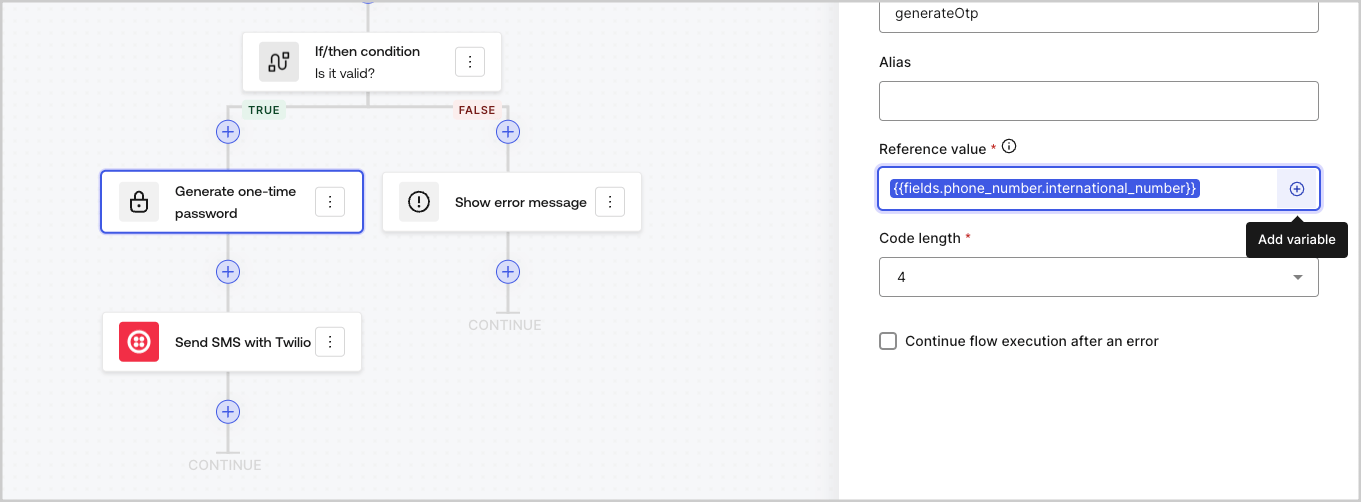
The autocomplete menu helps you locate and properly reference existing variables.
<Frame>
  <img src="https://mintcdn.com/docs-dev-docs-add-auth0-cli-management-api-examples/1z8Uqwf-Ck-y347i/docs/images/cdy7uua7fh8z/3SKnDuaMzSImxZtDDAoZaz/9ea800fad29ef71d1ded3c72b87660a4/Autocomplete-flows.png?fit=max&auto=format&n=1z8Uqwf-Ck-y347i&q=85&s=4a3085385b817e40c18122220b5ff8c2" alt="Dashboard > Actions > Forms > Flows" data-og-width="1361" width="1361" data-og-height="502" height="502" data-path="docs/images/cdy7uua7fh8z/3SKnDuaMzSImxZtDDAoZaz/9ea800fad29ef71d1ded3c72b87660a4/Autocomplete-flows.png" data-optimize="true" data-opv="3" srcset="https://mintcdn.com/docs-dev-docs-add-auth0-cli-management-api-examples/1z8Uqwf-Ck-y347i/docs/images/cdy7uua7fh8z/3SKnDuaMzSImxZtDDAoZaz/9ea800fad29ef71d1ded3c72b87660a4/Autocomplete-flows.png?w=280&fit=max&auto=format&n=1z8Uqwf-Ck-y347i&q=85&s=06efb506d99f99099a5351a44cde7cfc 280w, https://mintcdn.com/docs-dev-docs-add-auth0-cli-management-api-examples/1z8Uqwf-Ck-y347i/docs/images/cdy7uua7fh8z/3SKnDuaMzSImxZtDDAoZaz/9ea800fad29ef71d1ded3c72b87660a4/Autocomplete-flows.png?w=560&fit=max&auto=format&n=1z8Uqwf-Ck-y347i&q=85&s=17b422f06084f2795a783a965f230497 560w, https://mintcdn.com/docs-dev-docs-add-auth0-cli-management-api-examples/1z8Uqwf-Ck-y347i/docs/images/cdy7uua7fh8z/3SKnDuaMzSImxZtDDAoZaz/9ea800fad29ef71d1ded3c72b87660a4/Autocomplete-flows.png?w=840&fit=max&auto=format&n=1z8Uqwf-Ck-y347i&q=85&s=b15b6064dd5d0118e049bb25b19c763d 840w, https://mintcdn.com/docs-dev-docs-add-auth0-cli-management-api-examples/1z8Uqwf-Ck-y347i/docs/images/cdy7uua7fh8z/3SKnDuaMzSImxZtDDAoZaz/9ea800fad29ef71d1ded3c72b87660a4/Autocomplete-flows.png?w=1100&fit=max&auto=format&n=1z8Uqwf-Ck-y347i&q=85&s=1d780cf663acae50fc27995ad33dbd26 1100w, https://mintcdn.com/docs-dev-docs-add-auth0-cli-management-api-examples/1z8Uqwf-Ck-y347i/docs/images/cdy7uua7fh8z/3SKnDuaMzSImxZtDDAoZaz/9ea800fad29ef71d1ded3c72b87660a4/Autocomplete-flows.png?w=1650&fit=max&auto=format&n=1z8Uqwf-Ck-y347i&q=85&s=dde5b84861d93cc66ed3b6568af03471 1650w, https://mintcdn.com/docs-dev-docs-add-auth0-cli-management-api-examples/1z8Uqwf-Ck-y347i/docs/images/cdy7uua7fh8z/3SKnDuaMzSImxZtDDAoZaz/9ea800fad29ef71d1ded3c72b87660a4/Autocomplete-flows.png?w=2500&fit=max&auto=format&n=1z8Uqwf-Ck-y347i&q=85&s=120dc4636b7471b982df69fdce0914d5 2500w" />
</Frame>

<Frame>
  <img src="https://mintcdn.com/docs-dev-docs-add-auth0-cli-management-api-examples/1z8Uqwf-Ck-y347i/docs/images/cdy7uua7fh8z/2kjRKozVgrd2a7UJXOANaN/ee5452d7210cd2f13b0e97763f11c82a/Autocomplete-forms.png?fit=max&auto=format&n=1z8Uqwf-Ck-y347i&q=85&s=0ee4bae51ea2920ba5e4d30fec49d680" alt="Dashboard > Actions > Forms > Form" data-og-width="1394" width="1394" data-og-height="630" height="630" data-path="docs/images/cdy7uua7fh8z/2kjRKozVgrd2a7UJXOANaN/ee5452d7210cd2f13b0e97763f11c82a/Autocomplete-forms.png" data-optimize="true" data-opv="3" srcset="https://mintcdn.com/docs-dev-docs-add-auth0-cli-management-api-examples/1z8Uqwf-Ck-y347i/docs/images/cdy7uua7fh8z/2kjRKozVgrd2a7UJXOANaN/ee5452d7210cd2f13b0e97763f11c82a/Autocomplete-forms.png?w=280&fit=max&auto=format&n=1z8Uqwf-Ck-y347i&q=85&s=004f50bbbd0921a4203d12e242f07378 280w, https://mintcdn.com/docs-dev-docs-add-auth0-cli-management-api-examples/1z8Uqwf-Ck-y347i/docs/images/cdy7uua7fh8z/2kjRKozVgrd2a7UJXOANaN/ee5452d7210cd2f13b0e97763f11c82a/Autocomplete-forms.png?w=560&fit=max&auto=format&n=1z8Uqwf-Ck-y347i&q=85&s=646fbe34d229c9b7ea652d938b0cffd7 560w, https://mintcdn.com/docs-dev-docs-add-auth0-cli-management-api-examples/1z8Uqwf-Ck-y347i/docs/images/cdy7uua7fh8z/2kjRKozVgrd2a7UJXOANaN/ee5452d7210cd2f13b0e97763f11c82a/Autocomplete-forms.png?w=840&fit=max&auto=format&n=1z8Uqwf-Ck-y347i&q=85&s=90d83c3fb9f9b708a46b409d1f89fd81 840w, https://mintcdn.com/docs-dev-docs-add-auth0-cli-management-api-examples/1z8Uqwf-Ck-y347i/docs/images/cdy7uua7fh8z/2kjRKozVgrd2a7UJXOANaN/ee5452d7210cd2f13b0e97763f11c82a/Autocomplete-forms.png?w=1100&fit=max&auto=format&n=1z8Uqwf-Ck-y347i&q=85&s=62efe49faa050e5e1db4a48e0f03e18b 1100w, https://mintcdn.com/docs-dev-docs-add-auth0-cli-management-api-examples/1z8Uqwf-Ck-y347i/docs/images/cdy7uua7fh8z/2kjRKozVgrd2a7UJXOANaN/ee5452d7210cd2f13b0e97763f11c82a/Autocomplete-forms.png?w=1650&fit=max&auto=format&n=1z8Uqwf-Ck-y347i&q=85&s=8de7432ff673a6847c1fdc86518bc5d2 1650w, https://mintcdn.com/docs-dev-docs-add-auth0-cli-management-api-examples/1z8Uqwf-Ck-y347i/docs/images/cdy7uua7fh8z/2kjRKozVgrd2a7UJXOANaN/ee5452d7210cd2f13b0e97763f11c82a/Autocomplete-forms.png?w=2500&fit=max&auto=format&n=1z8Uqwf-Ck-y347i&q=85&s=bf59240afe902b0dd2896ed8df9a872c 2500w" />
</Frame>