> ## Documentation Index
> Fetch the complete documentation index at: https://docs-dev-docs-add-auth0-cli-management-api-examples.mintlify.site/llms.txt
> Use this file to discover all available pages before exploring further.

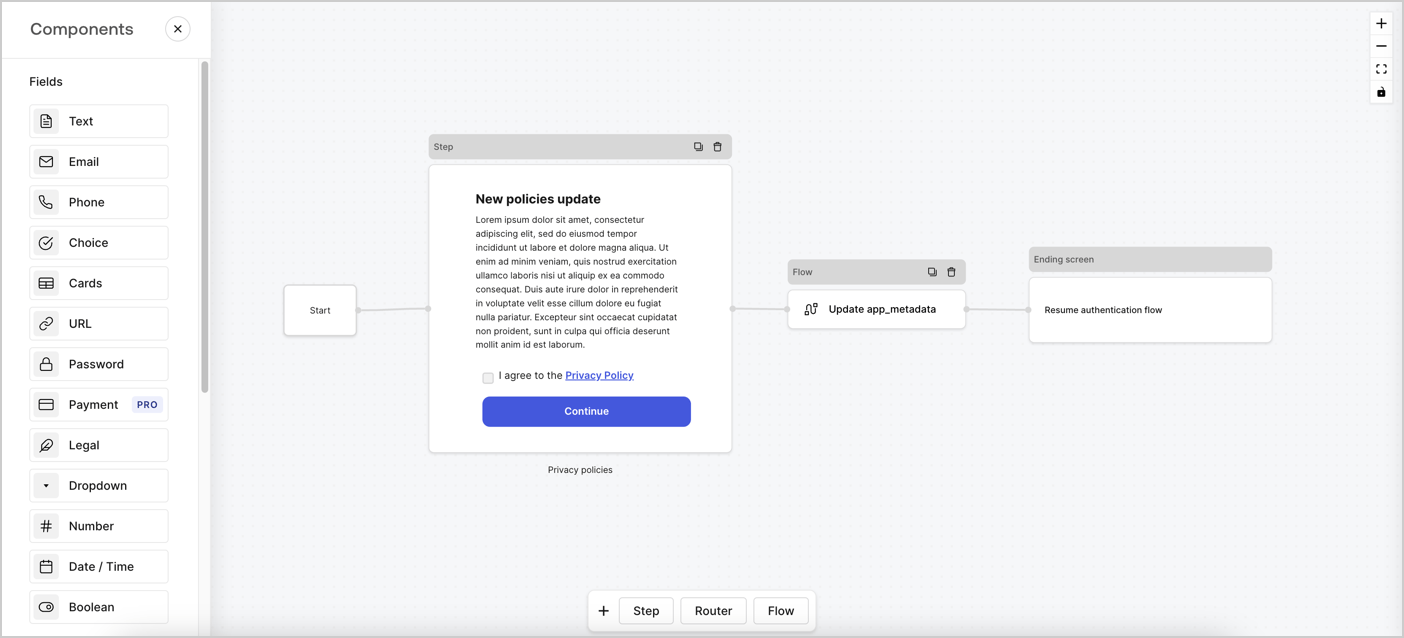
> Learn how to configure an update policy form using Forms for Actions for users to review and accept new terms of service or consent updates.

# Use Cases: Configure an update policy form using Forms

<Card title="Before you start">
  1. Create a [Machine-to-Machine Application](/docs/get-started/auth0-overview/create-applications/machine-to-machine-apps) with the following scopes enabled:

  * `read:users`
  * `update:users`
  * `create:users`
  * `read:users_app_metadata`
  * `update:users_app_metadata`
  * `create:users_app_metadata`

  2. Add a [Vault connection](/docs/customize/forms/vault) using the M2M application credentials.
</Card>

Forms for Actions allows you to create custom privacy policies flows and store the consent under the `app_metadata` object.
<Frame>
  <img src="https://mintcdn.com/docs-dev-docs-add-auth0-cli-management-api-examples/8Xt9BaI5_qlm0wDg/docs/images/cdy7uua7fh8z/6i68dMvHDTijfRmSgN1x8Q/ad900e7d4c0fb34645921435472b8684/privavy-policy-form.png?fit=max&auto=format&n=8Xt9BaI5_qlm0wDg&q=85&s=24831f70b3993e831594389e3fa9ae1c" alt="Dashboard > Actions > Forms > Privacy policy use case" data-og-width="1404" width="1404" data-og-height="638" height="638" data-path="docs/images/cdy7uua7fh8z/6i68dMvHDTijfRmSgN1x8Q/ad900e7d4c0fb34645921435472b8684/privavy-policy-form.png" data-optimize="true" data-opv="3" srcset="https://mintcdn.com/docs-dev-docs-add-auth0-cli-management-api-examples/8Xt9BaI5_qlm0wDg/docs/images/cdy7uua7fh8z/6i68dMvHDTijfRmSgN1x8Q/ad900e7d4c0fb34645921435472b8684/privavy-policy-form.png?w=280&fit=max&auto=format&n=8Xt9BaI5_qlm0wDg&q=85&s=1c2cab33c442e691e7f17c333b20ac49 280w, https://mintcdn.com/docs-dev-docs-add-auth0-cli-management-api-examples/8Xt9BaI5_qlm0wDg/docs/images/cdy7uua7fh8z/6i68dMvHDTijfRmSgN1x8Q/ad900e7d4c0fb34645921435472b8684/privavy-policy-form.png?w=560&fit=max&auto=format&n=8Xt9BaI5_qlm0wDg&q=85&s=55f351824b002fde6436f3506ec440c9 560w, https://mintcdn.com/docs-dev-docs-add-auth0-cli-management-api-examples/8Xt9BaI5_qlm0wDg/docs/images/cdy7uua7fh8z/6i68dMvHDTijfRmSgN1x8Q/ad900e7d4c0fb34645921435472b8684/privavy-policy-form.png?w=840&fit=max&auto=format&n=8Xt9BaI5_qlm0wDg&q=85&s=8bc8e1244d5fc99f44868595e4fcf05e 840w, https://mintcdn.com/docs-dev-docs-add-auth0-cli-management-api-examples/8Xt9BaI5_qlm0wDg/docs/images/cdy7uua7fh8z/6i68dMvHDTijfRmSgN1x8Q/ad900e7d4c0fb34645921435472b8684/privavy-policy-form.png?w=1100&fit=max&auto=format&n=8Xt9BaI5_qlm0wDg&q=85&s=4ed180352c103f4d213ebae981a482e6 1100w, https://mintcdn.com/docs-dev-docs-add-auth0-cli-management-api-examples/8Xt9BaI5_qlm0wDg/docs/images/cdy7uua7fh8z/6i68dMvHDTijfRmSgN1x8Q/ad900e7d4c0fb34645921435472b8684/privavy-policy-form.png?w=1650&fit=max&auto=format&n=8Xt9BaI5_qlm0wDg&q=85&s=92dfe6ca7a2801642f1ca5c395f86ec5 1650w, https://mintcdn.com/docs-dev-docs-add-auth0-cli-management-api-examples/8Xt9BaI5_qlm0wDg/docs/images/cdy7uua7fh8z/6i68dMvHDTijfRmSgN1x8Q/ad900e7d4c0fb34645921435472b8684/privavy-policy-form.png?w=2500&fit=max&auto=format&n=8Xt9BaI5_qlm0wDg&q=85&s=4fe5ecc3b814eb4f985d54caec1ee927 2500w" />
</Frame>

The sections below outline how you can create an Update Policy form using nodes and flows, along with steps for adding your form to a [Post Login](/docs/customize/actions/explore-triggers/signup-and-login-triggers/login-trigger) Action.

## Create a form from scratch

Follow these steps to create a form to gather information:

1. Open the Form editor by selecting **Auth0 Dashboard > Actions > Forms.**
2. Select **Create Form** > **Start from scratch**.

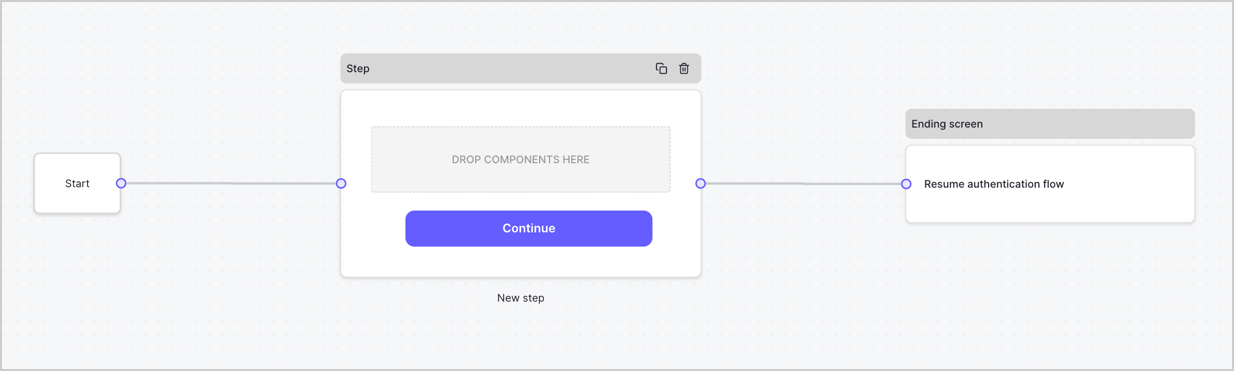
By default, a new form contains a Start node, a Step node, and an Ending screen node.
<Frame>
  <img src="https://mintcdn.com/docs-dev-docs-add-auth0-cli-management-api-examples/1z8Uqwf-Ck-y347i/docs/images/cdy7uua7fh8z/2TZ9jSjgEcARFpULI6hz4R/a4319a1bd482f2ee5cc23100fdb2f42c/New-form-Forms-for-action-use-case.png?fit=max&auto=format&n=1z8Uqwf-Ck-y347i&q=85&s=cefc60496b5c08c8d0956cc804379253" alt="Dashboard > Forms > Use Cases > Form" data-og-width="1234" width="1234" data-og-height="371" height="371" data-path="docs/images/cdy7uua7fh8z/2TZ9jSjgEcARFpULI6hz4R/a4319a1bd482f2ee5cc23100fdb2f42c/New-form-Forms-for-action-use-case.png" data-optimize="true" data-opv="3" srcset="https://mintcdn.com/docs-dev-docs-add-auth0-cli-management-api-examples/1z8Uqwf-Ck-y347i/docs/images/cdy7uua7fh8z/2TZ9jSjgEcARFpULI6hz4R/a4319a1bd482f2ee5cc23100fdb2f42c/New-form-Forms-for-action-use-case.png?w=280&fit=max&auto=format&n=1z8Uqwf-Ck-y347i&q=85&s=4509ef317e1a7968dcbcddfc91d08a7c 280w, https://mintcdn.com/docs-dev-docs-add-auth0-cli-management-api-examples/1z8Uqwf-Ck-y347i/docs/images/cdy7uua7fh8z/2TZ9jSjgEcARFpULI6hz4R/a4319a1bd482f2ee5cc23100fdb2f42c/New-form-Forms-for-action-use-case.png?w=560&fit=max&auto=format&n=1z8Uqwf-Ck-y347i&q=85&s=b2e9e0599a8a296437609e8158159355 560w, https://mintcdn.com/docs-dev-docs-add-auth0-cli-management-api-examples/1z8Uqwf-Ck-y347i/docs/images/cdy7uua7fh8z/2TZ9jSjgEcARFpULI6hz4R/a4319a1bd482f2ee5cc23100fdb2f42c/New-form-Forms-for-action-use-case.png?w=840&fit=max&auto=format&n=1z8Uqwf-Ck-y347i&q=85&s=7e5faf7a85cc0e410e14de03d0b9ad45 840w, https://mintcdn.com/docs-dev-docs-add-auth0-cli-management-api-examples/1z8Uqwf-Ck-y347i/docs/images/cdy7uua7fh8z/2TZ9jSjgEcARFpULI6hz4R/a4319a1bd482f2ee5cc23100fdb2f42c/New-form-Forms-for-action-use-case.png?w=1100&fit=max&auto=format&n=1z8Uqwf-Ck-y347i&q=85&s=da2bf7a4d6972c2608f05863d7b201b9 1100w, https://mintcdn.com/docs-dev-docs-add-auth0-cli-management-api-examples/1z8Uqwf-Ck-y347i/docs/images/cdy7uua7fh8z/2TZ9jSjgEcARFpULI6hz4R/a4319a1bd482f2ee5cc23100fdb2f42c/New-form-Forms-for-action-use-case.png?w=1650&fit=max&auto=format&n=1z8Uqwf-Ck-y347i&q=85&s=c4801247ff95341f5efa9b654c394e7d 1650w, https://mintcdn.com/docs-dev-docs-add-auth0-cli-management-api-examples/1z8Uqwf-Ck-y347i/docs/images/cdy7uua7fh8z/2TZ9jSjgEcARFpULI6hz4R/a4319a1bd482f2ee5cc23100fdb2f42c/New-form-Forms-for-action-use-case.png?w=2500&fit=max&auto=format&n=1z8Uqwf-Ck-y347i&q=85&s=f61a0b9ae40e1fc0be7a56c0f00ae3aa 2500w" />
</Frame>

### Configure the Step node

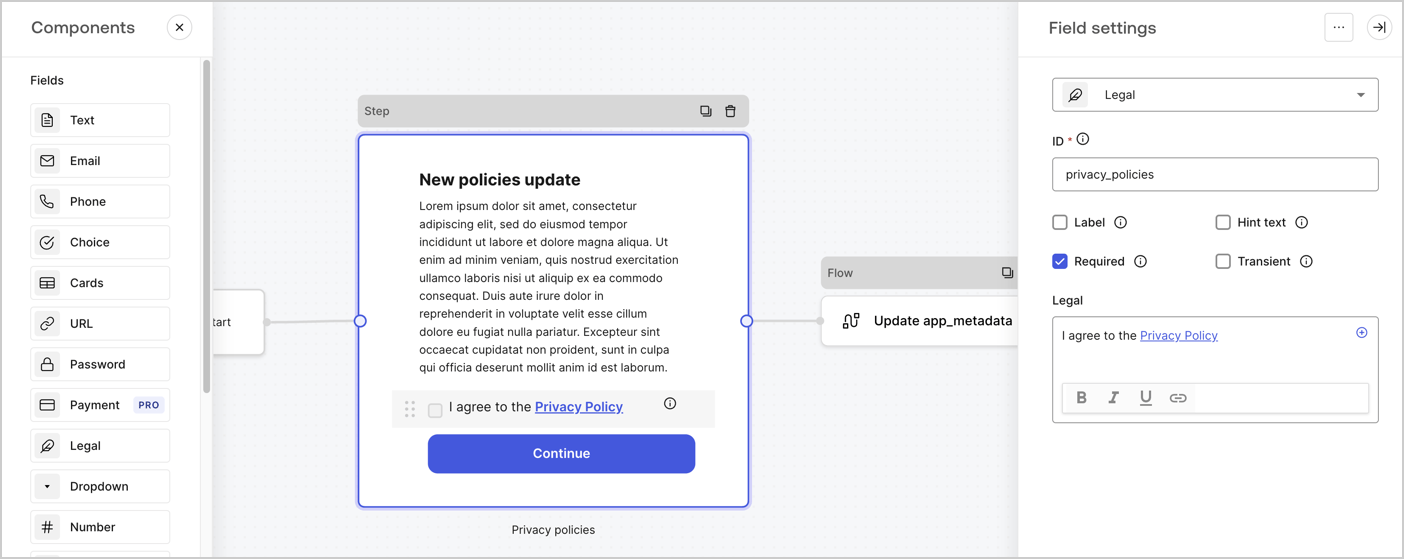
The Step node is the graphical interface visible to users. Add [Fields](/docs/customize/forms/nodes-and-components) to the Step node to collect the new agreement acceptance value by following these steps:

1. Drag a **Rich text** field from the **Components menu** into the **Step** node.

   * **Rich text**: Enter a description of your privacy policies updates.
   * Select **Save**.
2. Drag a **Legal** field into the **Step** node.

   * **ID**: Enter `privacy_policies`.
   * **Required**: Enable the checkbox.
   * **Legal**: Enter `I agree to the Privacy Policy`.
   * Select **Save**.
3. Select **Publish** to save.
<Frame>
  <img src="https://mintcdn.com/docs-dev-docs-add-auth0-cli-management-api-examples/iIP1qHqXW4D_Pm7x/docs/images/cdy7uua7fh8z/59zFFjQjAnjogkc2QGIqqJ/0ad66b1b636544122aa4e65968b76c2c/privacy-policy-step-node.png?fit=max&auto=format&n=iIP1qHqXW4D_Pm7x&q=85&s=17ddc7ef9a59aae4c32718348fe9b644" alt="Dashboard > Actions > Forms > Use case privacy policy step node" data-og-width="1404" width="1404" data-og-height="559" height="559" data-path="docs/images/cdy7uua7fh8z/59zFFjQjAnjogkc2QGIqqJ/0ad66b1b636544122aa4e65968b76c2c/privacy-policy-step-node.png" data-optimize="true" data-opv="3" srcset="https://mintcdn.com/docs-dev-docs-add-auth0-cli-management-api-examples/iIP1qHqXW4D_Pm7x/docs/images/cdy7uua7fh8z/59zFFjQjAnjogkc2QGIqqJ/0ad66b1b636544122aa4e65968b76c2c/privacy-policy-step-node.png?w=280&fit=max&auto=format&n=iIP1qHqXW4D_Pm7x&q=85&s=21e955da29ee622e12d985bedf245da8 280w, https://mintcdn.com/docs-dev-docs-add-auth0-cli-management-api-examples/iIP1qHqXW4D_Pm7x/docs/images/cdy7uua7fh8z/59zFFjQjAnjogkc2QGIqqJ/0ad66b1b636544122aa4e65968b76c2c/privacy-policy-step-node.png?w=560&fit=max&auto=format&n=iIP1qHqXW4D_Pm7x&q=85&s=7d52163cd1789aa7bd74bfa865b5ff76 560w, https://mintcdn.com/docs-dev-docs-add-auth0-cli-management-api-examples/iIP1qHqXW4D_Pm7x/docs/images/cdy7uua7fh8z/59zFFjQjAnjogkc2QGIqqJ/0ad66b1b636544122aa4e65968b76c2c/privacy-policy-step-node.png?w=840&fit=max&auto=format&n=iIP1qHqXW4D_Pm7x&q=85&s=8f468673af98dbce7ea8905f828a4a0d 840w, https://mintcdn.com/docs-dev-docs-add-auth0-cli-management-api-examples/iIP1qHqXW4D_Pm7x/docs/images/cdy7uua7fh8z/59zFFjQjAnjogkc2QGIqqJ/0ad66b1b636544122aa4e65968b76c2c/privacy-policy-step-node.png?w=1100&fit=max&auto=format&n=iIP1qHqXW4D_Pm7x&q=85&s=8d306c6ed2b41fb22d24775d77333a6b 1100w, https://mintcdn.com/docs-dev-docs-add-auth0-cli-management-api-examples/iIP1qHqXW4D_Pm7x/docs/images/cdy7uua7fh8z/59zFFjQjAnjogkc2QGIqqJ/0ad66b1b636544122aa4e65968b76c2c/privacy-policy-step-node.png?w=1650&fit=max&auto=format&n=iIP1qHqXW4D_Pm7x&q=85&s=5c831db8a2661337fc9e8dacd41ba480 1650w, https://mintcdn.com/docs-dev-docs-add-auth0-cli-management-api-examples/iIP1qHqXW4D_Pm7x/docs/images/cdy7uua7fh8z/59zFFjQjAnjogkc2QGIqqJ/0ad66b1b636544122aa4e65968b76c2c/privacy-policy-step-node.png?w=2500&fit=max&auto=format&n=iIP1qHqXW4D_Pm7x&q=85&s=9bcbf60897b0253361275cfa062df05e 2500w" />
</Frame>

### Configure the Flow node

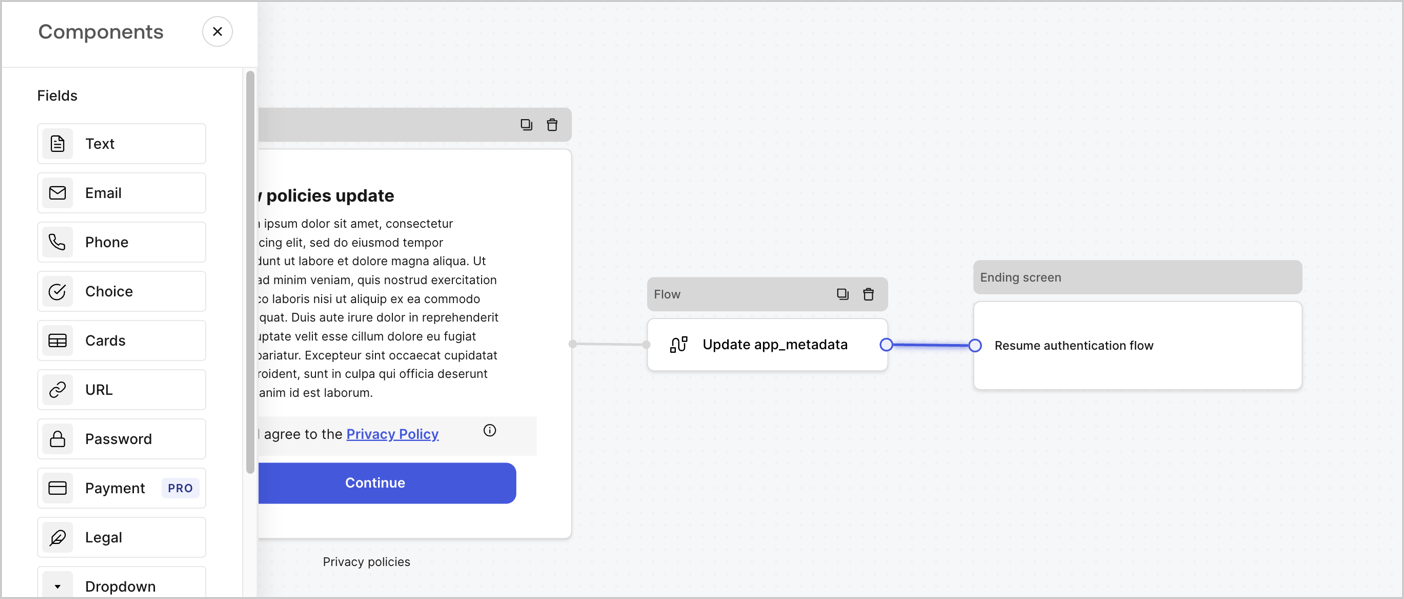
Add a **Flow** node after the **Step** node to update the `app_metadata` and resume the authentication flow by following these steps:

1. Select **Flow** from the bottom of the Form editor.
2. Remove the existing link between the **Step** and **Ending Screen** nodes.
3. Select the new **Flow** > **Click to add a flow** > **Create a new flow.**

   * Enter `Update app_metadata` in the **Name** field.
   * Select **Create**.
   * Select **Save**.
4. Link the **Flow** node to the **Step** and **Ending Screen** nodes as pictured below.
5. Select **Publish** to save.
<Frame>
  <img src="https://mintcdn.com/docs-dev-docs-add-auth0-cli-management-api-examples/8Xt9BaI5_qlm0wDg/docs/images/cdy7uua7fh8z/6YIkzm7SrpM9LW76AXuRzh/353c518fe82bbaa440836da1d83596d6/link-policies.png?fit=max&auto=format&n=8Xt9BaI5_qlm0wDg&q=85&s=92c25949eb87558689c6678e1f33b966" alt="Dashboard > Actions > Forms > Form" data-og-width="1404" width="1404" data-og-height="599" height="599" data-path="docs/images/cdy7uua7fh8z/6YIkzm7SrpM9LW76AXuRzh/353c518fe82bbaa440836da1d83596d6/link-policies.png" data-optimize="true" data-opv="3" srcset="https://mintcdn.com/docs-dev-docs-add-auth0-cli-management-api-examples/8Xt9BaI5_qlm0wDg/docs/images/cdy7uua7fh8z/6YIkzm7SrpM9LW76AXuRzh/353c518fe82bbaa440836da1d83596d6/link-policies.png?w=280&fit=max&auto=format&n=8Xt9BaI5_qlm0wDg&q=85&s=1354b9fb8b72b2817bf788d4a4d98b49 280w, https://mintcdn.com/docs-dev-docs-add-auth0-cli-management-api-examples/8Xt9BaI5_qlm0wDg/docs/images/cdy7uua7fh8z/6YIkzm7SrpM9LW76AXuRzh/353c518fe82bbaa440836da1d83596d6/link-policies.png?w=560&fit=max&auto=format&n=8Xt9BaI5_qlm0wDg&q=85&s=1a007f886a19d08a73b37811cfc60d11 560w, https://mintcdn.com/docs-dev-docs-add-auth0-cli-management-api-examples/8Xt9BaI5_qlm0wDg/docs/images/cdy7uua7fh8z/6YIkzm7SrpM9LW76AXuRzh/353c518fe82bbaa440836da1d83596d6/link-policies.png?w=840&fit=max&auto=format&n=8Xt9BaI5_qlm0wDg&q=85&s=83ad8d7ffb819fc56c62954a6c788c46 840w, https://mintcdn.com/docs-dev-docs-add-auth0-cli-management-api-examples/8Xt9BaI5_qlm0wDg/docs/images/cdy7uua7fh8z/6YIkzm7SrpM9LW76AXuRzh/353c518fe82bbaa440836da1d83596d6/link-policies.png?w=1100&fit=max&auto=format&n=8Xt9BaI5_qlm0wDg&q=85&s=e89dd3b90c9aa0381d744a5541d55dc6 1100w, https://mintcdn.com/docs-dev-docs-add-auth0-cli-management-api-examples/8Xt9BaI5_qlm0wDg/docs/images/cdy7uua7fh8z/6YIkzm7SrpM9LW76AXuRzh/353c518fe82bbaa440836da1d83596d6/link-policies.png?w=1650&fit=max&auto=format&n=8Xt9BaI5_qlm0wDg&q=85&s=424316b6dbe717bc69a012b744f09ff0 1650w, https://mintcdn.com/docs-dev-docs-add-auth0-cli-management-api-examples/8Xt9BaI5_qlm0wDg/docs/images/cdy7uua7fh8z/6YIkzm7SrpM9LW76AXuRzh/353c518fe82bbaa440836da1d83596d6/link-policies.png?w=2500&fit=max&auto=format&n=8Xt9BaI5_qlm0wDg&q=85&s=851bf7e5d0d418503173ef2298f70a3b 2500w" />
</Frame>

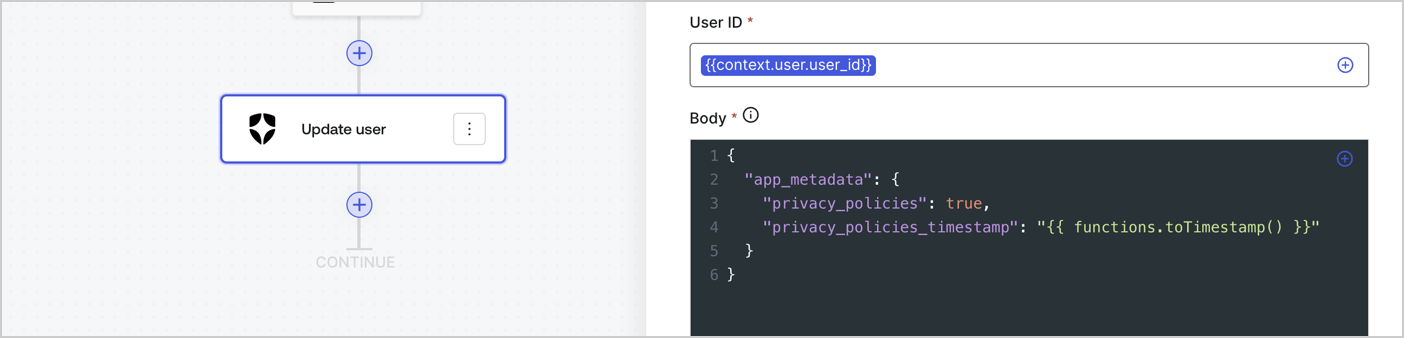
Add an Auth0 Update user action to the flow by following these steps:

1. Select the **Flow** **Update app\_metadata** > **Edit flow** to open the Flow editor in a new tab.
2. Below the StartAction, select the **+** icon to add an **Update user** action. Complete the fields below, then select **Save** to continue.

   * **Connection**: Select from the dropdown the Vault connection to your M2M application.

   * **User ID**: Enter `{{context.user.user_id}}`.

   * **Body**: Copy and paste the following code to update the app\_metadata with the privacy\_policies and privacy\_policies\_timestamp properties.

     ```text lines theme={null}
     {
       "app_metadata": {
         "privacy_policies": true,
         "privacy_policies_timestamp": "{{ functions.toTimestamp() }}"
       }
     }
     ```

   * Select **Save**.
3. Select **Publish** to save.
<Frame>
  <img src="https://mintcdn.com/docs-dev-docs-add-auth0-cli-management-api-examples/eotwGWqx1nIXj0Wv/docs/images/cdy7uua7fh8z/CvMNIwWrOUwaFW4X3G28p/1fb70ae57a20749d9ffaaba8dc0b7e26/update-user-privacy.png?fit=max&auto=format&n=eotwGWqx1nIXj0Wv&q=85&s=271646eeab897f26cc633d780213780d" alt="Dashboard > Actions > Forms > User case privacy policy code" data-og-width="1404" width="1404" data-og-height="338" height="338" data-path="docs/images/cdy7uua7fh8z/CvMNIwWrOUwaFW4X3G28p/1fb70ae57a20749d9ffaaba8dc0b7e26/update-user-privacy.png" data-optimize="true" data-opv="3" srcset="https://mintcdn.com/docs-dev-docs-add-auth0-cli-management-api-examples/eotwGWqx1nIXj0Wv/docs/images/cdy7uua7fh8z/CvMNIwWrOUwaFW4X3G28p/1fb70ae57a20749d9ffaaba8dc0b7e26/update-user-privacy.png?w=280&fit=max&auto=format&n=eotwGWqx1nIXj0Wv&q=85&s=4e8a719fe533cf7270d6eb2e8ffc0279 280w, https://mintcdn.com/docs-dev-docs-add-auth0-cli-management-api-examples/eotwGWqx1nIXj0Wv/docs/images/cdy7uua7fh8z/CvMNIwWrOUwaFW4X3G28p/1fb70ae57a20749d9ffaaba8dc0b7e26/update-user-privacy.png?w=560&fit=max&auto=format&n=eotwGWqx1nIXj0Wv&q=85&s=746c60201d585a3f323c2f4d19a1c7aa 560w, https://mintcdn.com/docs-dev-docs-add-auth0-cli-management-api-examples/eotwGWqx1nIXj0Wv/docs/images/cdy7uua7fh8z/CvMNIwWrOUwaFW4X3G28p/1fb70ae57a20749d9ffaaba8dc0b7e26/update-user-privacy.png?w=840&fit=max&auto=format&n=eotwGWqx1nIXj0Wv&q=85&s=c7ad9b4a6d1f5738c497cc1986f8ffa4 840w, https://mintcdn.com/docs-dev-docs-add-auth0-cli-management-api-examples/eotwGWqx1nIXj0Wv/docs/images/cdy7uua7fh8z/CvMNIwWrOUwaFW4X3G28p/1fb70ae57a20749d9ffaaba8dc0b7e26/update-user-privacy.png?w=1100&fit=max&auto=format&n=eotwGWqx1nIXj0Wv&q=85&s=cef68bb0fab56437a92174398c7b3746 1100w, https://mintcdn.com/docs-dev-docs-add-auth0-cli-management-api-examples/eotwGWqx1nIXj0Wv/docs/images/cdy7uua7fh8z/CvMNIwWrOUwaFW4X3G28p/1fb70ae57a20749d9ffaaba8dc0b7e26/update-user-privacy.png?w=1650&fit=max&auto=format&n=eotwGWqx1nIXj0Wv&q=85&s=c0ec3fc290e83af545a9fdfdb8cd4084 1650w, https://mintcdn.com/docs-dev-docs-add-auth0-cli-management-api-examples/eotwGWqx1nIXj0Wv/docs/images/cdy7uua7fh8z/CvMNIwWrOUwaFW4X3G28p/1fb70ae57a20749d9ffaaba8dc0b7e26/update-user-privacy.png?w=2500&fit=max&auto=format&n=eotwGWqx1nIXj0Wv&q=85&s=812229938c60640fa176eb376f82149c 2500w" />
</Frame>

<Callout icon="file-lines" color="#0EA5E9" iconType="regular">
  The flow **Update app\_metadata** adds a `privacy_policies true` value to the app`_metadata` object and also generates a timestamp with a [helper function.](/docs/customize/forms/variables)
</Callout>

## Retrieve the form render code

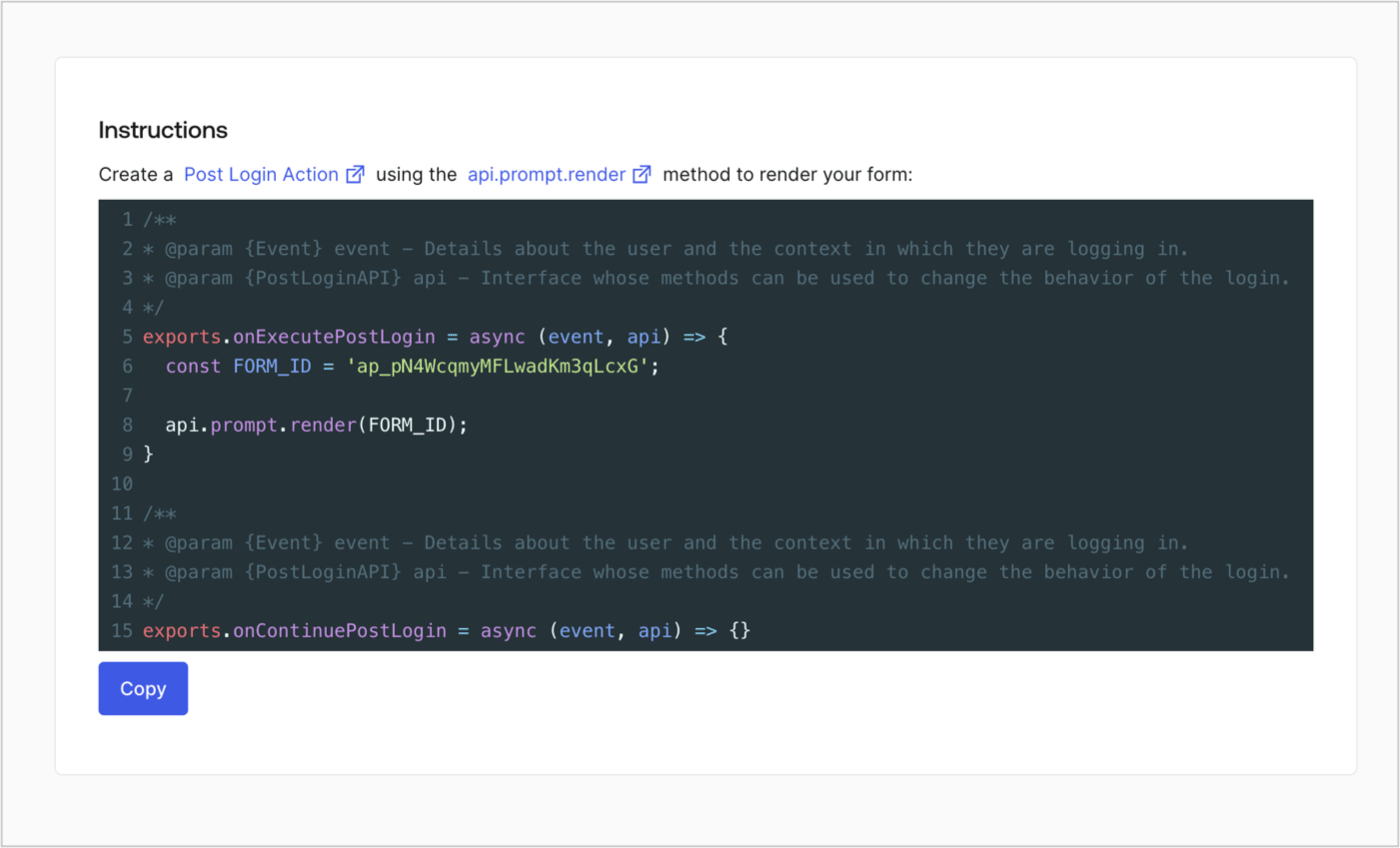
Retrieve your form render code to visually render the form with a custom Post Login Action by following these steps:

* From the Form editor, select **`<> Render`**.
* Select **Copy**.
<Frame>
  <img src="https://mintcdn.com/docs-dev-docs-add-auth0-cli-management-api-examples/i9mIpcfLxROfkyru/docs/images/cdy7uua7fh8z/2EIUzc539sq9lwoTKbjoJv/496a864c0fc44a782c9cadca119dbfb0/embed.png?fit=max&auto=format&n=i9mIpcfLxROfkyru&q=85&s=ad636ab9f6af86920ecab796e89ee539" alt="Dashboard > Actions > Forms > Form > Embed" data-og-width="1400" width="1400" data-og-height="848" height="848" data-path="docs/images/cdy7uua7fh8z/2EIUzc539sq9lwoTKbjoJv/496a864c0fc44a782c9cadca119dbfb0/embed.png" data-optimize="true" data-opv="3" srcset="https://mintcdn.com/docs-dev-docs-add-auth0-cli-management-api-examples/i9mIpcfLxROfkyru/docs/images/cdy7uua7fh8z/2EIUzc539sq9lwoTKbjoJv/496a864c0fc44a782c9cadca119dbfb0/embed.png?w=280&fit=max&auto=format&n=i9mIpcfLxROfkyru&q=85&s=48e8284731d0168e03ca232167bd50d8 280w, https://mintcdn.com/docs-dev-docs-add-auth0-cli-management-api-examples/i9mIpcfLxROfkyru/docs/images/cdy7uua7fh8z/2EIUzc539sq9lwoTKbjoJv/496a864c0fc44a782c9cadca119dbfb0/embed.png?w=560&fit=max&auto=format&n=i9mIpcfLxROfkyru&q=85&s=7b8fb9ee06642874463d6088572a7af9 560w, https://mintcdn.com/docs-dev-docs-add-auth0-cli-management-api-examples/i9mIpcfLxROfkyru/docs/images/cdy7uua7fh8z/2EIUzc539sq9lwoTKbjoJv/496a864c0fc44a782c9cadca119dbfb0/embed.png?w=840&fit=max&auto=format&n=i9mIpcfLxROfkyru&q=85&s=0b6f76811de1767454110131757f07b5 840w, https://mintcdn.com/docs-dev-docs-add-auth0-cli-management-api-examples/i9mIpcfLxROfkyru/docs/images/cdy7uua7fh8z/2EIUzc539sq9lwoTKbjoJv/496a864c0fc44a782c9cadca119dbfb0/embed.png?w=1100&fit=max&auto=format&n=i9mIpcfLxROfkyru&q=85&s=f3b90c05dd87614ddcdfc1cd699b9b9e 1100w, https://mintcdn.com/docs-dev-docs-add-auth0-cli-management-api-examples/i9mIpcfLxROfkyru/docs/images/cdy7uua7fh8z/2EIUzc539sq9lwoTKbjoJv/496a864c0fc44a782c9cadca119dbfb0/embed.png?w=1650&fit=max&auto=format&n=i9mIpcfLxROfkyru&q=85&s=ccddacdc4030cc1d1cf4844fb7caf28f 1650w, https://mintcdn.com/docs-dev-docs-add-auth0-cli-management-api-examples/i9mIpcfLxROfkyru/docs/images/cdy7uua7fh8z/2EIUzc539sq9lwoTKbjoJv/496a864c0fc44a782c9cadca119dbfb0/embed.png?w=2500&fit=max&auto=format&n=i9mIpcfLxROfkyru&q=85&s=d7920bbc76cb24ea458cc3dafc2b6f8e 2500w" />
</Frame>

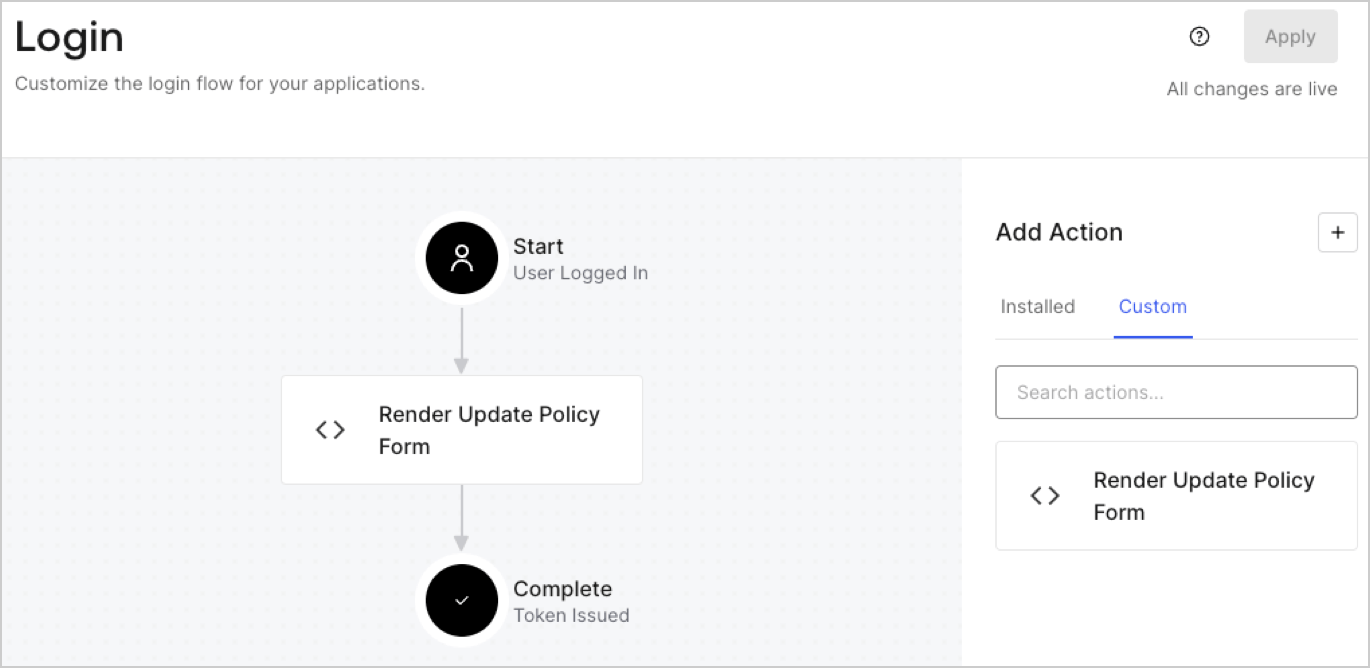
## Create a Post Login Action

Create a post-login Action to render your form by following these steps:

1. Navigate to **Auth0 Dashboard > Actions > Flows > Login.**
2. Select the **+** icon and Select **Build from scratch**:

   * **Name**: Enter `Render Update Policy Form`.
   * **Trigger**: Select `Login / Post Login`.
   * **Runtime**: Select the recommended version.
3. Select **Create**.

To configure the post-login Action:

1. Delete the existing code from the Code editor.
2. Paste the form render code into the Code editor.
3. Edit the code to define the conditional logic that will render the form.

   ```javascript lines theme={null}
   /**
   * @param {Event} event - Details about the user and the context in which they are logging in.
   * @param {PostLoginAPI} api - Interface whose methods can be used to change the behavior of the login.
   */
   exports.onExecutePostLogin = async (event, api) => {
     const FORM_ID = 'REPLACE_WITH_YOUR_FORM_ID';

     if (event.user.app_metadata.privacy_policies !== true) {
       api.prompt.render(FORM_ID);
     }
   }

   exports.onContinuePostLogin = async (event, api) => { }
   ```

   <Callout icon="file-lines" color="#0EA5E9" iconType="regular">
     The example code above will render the form when a user is missing the app metadata `privacy_policies` property.
   </Callout>
4. Select **Deploy.**
5. Drag and Drop the **Render Update Policy Form** Action to the **Login** flow.
   <Frame>
     <img src="https://mintcdn.com/docs-dev-docs-add-auth0-cli-management-api-examples/cLUMAJOI90NNSgfh/docs/images/cdy7uua7fh8z/5TOwDgevZsBqd7yZynUYWU/41ca909dc3007aed4f40ff794a05efa5/postlogin.png?fit=max&auto=format&n=cLUMAJOI90NNSgfh&q=85&s=c3a6c7a51ba16feb40f64897a5ff97c0" alt="Dashboard > Forms > Use Case > Render update policy form login action" data-og-width="1370" width="1370" data-og-height="668" height="668" data-path="docs/images/cdy7uua7fh8z/5TOwDgevZsBqd7yZynUYWU/41ca909dc3007aed4f40ff794a05efa5/postlogin.png" data-optimize="true" data-opv="3" srcset="https://mintcdn.com/docs-dev-docs-add-auth0-cli-management-api-examples/cLUMAJOI90NNSgfh/docs/images/cdy7uua7fh8z/5TOwDgevZsBqd7yZynUYWU/41ca909dc3007aed4f40ff794a05efa5/postlogin.png?w=280&fit=max&auto=format&n=cLUMAJOI90NNSgfh&q=85&s=cc35e2c63d601601f2263898af7c936b 280w, https://mintcdn.com/docs-dev-docs-add-auth0-cli-management-api-examples/cLUMAJOI90NNSgfh/docs/images/cdy7uua7fh8z/5TOwDgevZsBqd7yZynUYWU/41ca909dc3007aed4f40ff794a05efa5/postlogin.png?w=560&fit=max&auto=format&n=cLUMAJOI90NNSgfh&q=85&s=90136ad271002e2adb8422aa2b2af86d 560w, https://mintcdn.com/docs-dev-docs-add-auth0-cli-management-api-examples/cLUMAJOI90NNSgfh/docs/images/cdy7uua7fh8z/5TOwDgevZsBqd7yZynUYWU/41ca909dc3007aed4f40ff794a05efa5/postlogin.png?w=840&fit=max&auto=format&n=cLUMAJOI90NNSgfh&q=85&s=5dfb00de6f6722feb5d915a31845a489 840w, https://mintcdn.com/docs-dev-docs-add-auth0-cli-management-api-examples/cLUMAJOI90NNSgfh/docs/images/cdy7uua7fh8z/5TOwDgevZsBqd7yZynUYWU/41ca909dc3007aed4f40ff794a05efa5/postlogin.png?w=1100&fit=max&auto=format&n=cLUMAJOI90NNSgfh&q=85&s=b2aea75af55d9cd424a392c3500cca2a 1100w, https://mintcdn.com/docs-dev-docs-add-auth0-cli-management-api-examples/cLUMAJOI90NNSgfh/docs/images/cdy7uua7fh8z/5TOwDgevZsBqd7yZynUYWU/41ca909dc3007aed4f40ff794a05efa5/postlogin.png?w=1650&fit=max&auto=format&n=cLUMAJOI90NNSgfh&q=85&s=97fc4f586b3013ca10c54d9784a3e7bb 1650w, https://mintcdn.com/docs-dev-docs-add-auth0-cli-management-api-examples/cLUMAJOI90NNSgfh/docs/images/cdy7uua7fh8z/5TOwDgevZsBqd7yZynUYWU/41ca909dc3007aed4f40ff794a05efa5/postlogin.png?w=2500&fit=max&auto=format&n=cLUMAJOI90NNSgfh&q=85&s=c8def421b558f930b4573e269916337e 2500w" />
   </Frame>
6. Select **Apply.**

### Test implementation

Test the implementation by following these steps:

1. Log in with an existing user whose app`_metadata` attribute `privacy_policies` does not have a value.
2. The post-login Action in the Login flow will render the form and prompt for acceptance.
3. Select **Auth0 Dashboard > User Management > Users,** locate the user and verify that the `app_metadata` attribute `privacy_policies` contains a `true` value and a timestamp.
